
Speed Up Question Editing in LearnDash
If your LearnDash-powered LMS has grown to thousands of users and millions of quiz attempts, you’ve probably noticed something frustrating: editing quiz questions becomes slow-sometimes taking several seconds to load.
This happens because LearnDash performs expensive lookups in the quiz statistics table.
The solution?
A single database index that reduces certain queries from multiple seconds to microseconds.
This guide explains exactly how to:
Tested with LearnDash LMS v4.25.6
Who Should Read This?
This article is for you if:
- Your site has more than hundreds of thousands of quiz statistics rows.
- Editing quiz questions feels slow or laggy.
- You want an easy, safe, impactful optimization.
Why Question Editing Becomes Slow
When you update a quiz question, LearnDash runs this kind of query:
SELECT COUNT(*)
FROM wp_wp_pro_quiz_statistic
WHERE question_id = <current_question_id>;
On a table with millions of rows and no index on question_id, MySQL must scan the entire statistics table – which can take seconds.
Adding the index tells MySQL:
“You can jump directly to relevant rows instead of scanning everything.”
The result is a nearly instant lookup.
Solution
Step 1: Identify Your Statistics Table
LearnDash installations can differ:
- Older setups →
{prefix}wp_pro_quiz_statistic - Newer →
{prefix}learndash_pro_quiz_statistic
To confirm:
WordPress Dashboard → LearnDash LMS → Settings → Support → Database Tables
Look for a row containing: pro_quiz_statistic

In my setup, the table name is `wp_wp_pro_quiz_statistic`. Similarly, my question table name is `wp_wp_pro_quiz_question`.
Step 2: Retrieve a Question ID for Testing
Run this query to find your latest question ID: (Replace the table name if yours differs. Use Quiz Question table name.)
SELECT `id`
FROM `wp_wp_pro_quiz_question`
ORDER BY `id` DESC
LIMIT 1;
Suppose it returns:
79587
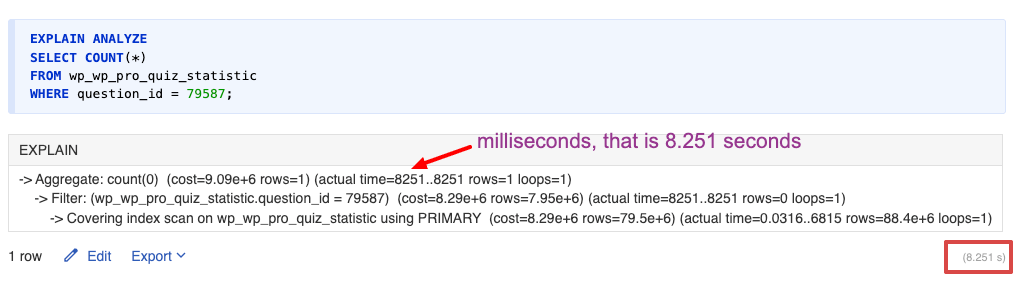
Step 3: Benchmark the Current Performance
Run: (Replace the table name and question_id if yours differ.)
EXPLAIN ANALYZE
SELECT COUNT(*)
FROM wp_wp_pro_quiz_statistic
WHERE question_id = 79587;
If it takes more than 0.3 seconds, you will benefit from indexing.
In my case:
❌ 8.251 seconds — far too slow.
Video Walkthrough
Here’s a helpful demo showing:
- How to measure query timing
- Where in LearnDash code the issue occurs
- How indexing fixes it
- [Optional] core file optimization
This video does not have audio
Step 4: Apply the Fix (Add Index)
Run the following SQL command:(Replace the table name if yours differs.)
ALTER TABLE wp_wp_pro_quiz_statistic
ADD INDEX idx_question_id (question_id);
This typically completes in under a minute.
Step 5: Re-test the Query
Run the benchmark again:(Replace the table name if yours differs.)
EXPLAIN ANALYZE
SELECT COUNT(*)
FROM wp_wp_pro_quiz_statistic
WHERE question_id = 79587;
Performance Comparison In My Case
| Query Benchmark | Time Before | Time After |
|---|---|---|
| Count by question_id | 8.251 seconds | 0.00001 seconds |

Optional: Further Optimization(for developers)
You may modify the core file for further improvement. Only do this if you’re experienced with PHP and confident working with LearnDash internals.
In the file sfwd-lms/includes/lib/wp-pro-quiz/lib/model/WpProQuiz_Model_StatisticMapper.php there is a function isStatisticByQuestionId. The existing query as below
return $this->_wpdb->get_var(
    $this->_wpdb->prepare(
        "SELECT
            COUNT(*)
        FROM
            {$this->_tableStatistic}
        WHERE
            question_id = %d",
        $questionId
    )
);
After modifying, it would look like this
return $this->_wpdb->get_var(
    $this->_wpdb->prepare(
        "SELECT
            1
        FROM
            {$this->_tableStatistic}
        WHERE
            question_id = %d
        LIMIT 1",
        $questionId
    )
);
Two changes in the code,
1. Instead of selecting all columns using *, I am selecting 1. This query is specifically to know if a row exists for the question ID.
2. Added a limit of 1.
Rollback (If Needed)
If you ever need to remove the index(Replace the table name if yours differs.):
ALTER TABLE wp_wp_pro_quiz_statistic
DROP INDEX idx_question_id;
Conclusion
Large LearnDash sites often suffer from slow admin performance due to missing indexes. Fortunately, the fix is straightforward:
Add an index on question_id in the statistics table.
This transforms multi-second queries into instant lookups and significantly improves the question-editing experience.
If you have questions about your setup, need help applying this fix, or want deeper optimizations, feel free to comment below!
